
Andrew Lee

The Future

I cannot wait to get onto a real web host. StatiCloud is obviously nice since it’s free, easy to setup, free, and great for static sites (and free). But since starting this blog, I have a greater understanding of how crucial a CMS is.

A CMS or Content Management System (WordPress, Joomla, Drupal) enables bloggers to easily produce content. A CMS usually has a built-in commenting system that requires no coding at all to setup unless you’d like to add some style with CSS. With a CMS, you can make a single blog post without having to manually move another post to another page since your first page is now too long and everything has consequently been ruined. And my favorite feature of a CMS: you can make one design change which then propagates to all other pages! Amazing! These are obviously just a few of the features that a CMS provides, but these are the ones that I think most pertain to blogging.

I enjoy having the control that I have over this blog, but even writing a simple blog post can take some time. I would rather focus on the content then coding every little element.

Don’t get me wrong – this blog has increased my knowledge of HTML and CSS greatly. I would recommend the way that I’ve learned to just about anybody starting out. But… WordPress is calling my name and I can’t wait to jump over.
Faster

Everyone wants a faster loading website. One tip that I came across the other day is to move your scripts that you would normally include in the head tag down to just above the closing body tag. Since your website starts loading from the top of your code to the bottom, the extra scripts at the bottom will load last enabling your main, viewable content to be loaded faster.

Follow the link for more speed tips.

Environment Part 2

I code primarily on a Dell Latitude D620 running Windows 7. It has 3GB of RAM, a Core 2 Duo CPU running at 1.66GHz (which also runs extremely hot), and a 250GB hard drive. I like to have it sitting in it’s dock with another monitor attached, but usually I just use it by itself.

Do I wish for a sleek, amazing Macbook Pro? Of course. In fact, I would go so far as to say I yearn for a Mac. But this laptop gets the job done.

I can wish all day for a new laptop (and I usually do), but that doesn’t change the fact that this laptop still works. A piece of advice that I can offer when trying to learn how to code is do so in the environment that you are currently in. Using a 486 computer that’s fifteen years old running Windows 3.1 with a monitor running 640×480? Go for it! One of the best ways to learn code is simply to write it! Amazing, right? Daily writing some form of code can be a challenge but it’s the best way to learn.

I’m organizing some more links to share to continue on with this “learning” theme. I’ll get that posted soon.

Environment Part 1

Nine minutes have gone by since my last post and I’m ready to post another entry - so far this is going well.

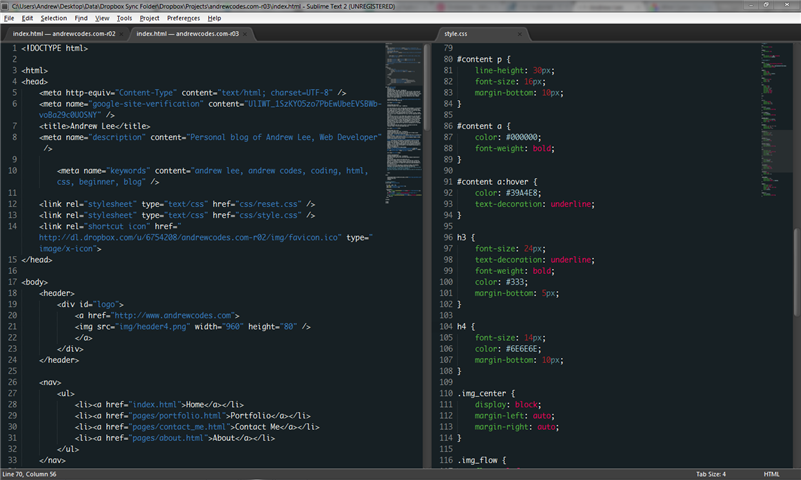
Sublime Text 2 is currently my coding environment. I used to use Notepad++ but Sublime won me over due to its fantastic themes, a great looking coding window, and also this post from Nettuts+.

Sublime is free to use (but prompts you to purchase a license after some use) and does not have the “clunky” feel like Notepad++. Sublime feels like I went from Windows 95 to Windows 7. It has a great snippets manager (as does Notepad++) but there’s something to be said about the aesthetic of the software you use daily: it needs to look decent.

Here’s a screenshot of my coding window:

Sublime Text 2 screenshot

Hello and Welcome

It seems to me like the very first post should always be some kind of greeting.

Hi, how are you? I hope you are doing well.

Since we’ve gotten that out of the way, let me tell you a little bit about me. I am currently a Desktop Support Technician that also does some Web Development work but I’ve caught the coding bug and Web Development is all I want to do.

This site will be a blog about my learning of coding, web standards, typography, and probably some random posts here and there.